Best Keyboard For Writers: 10 Great Options (2026)
Filter & Compare Writing Software
Filter verified writing, Markdown, note-taking, and book formatting tools by platform, export format, and multi-year cost. Everything runs in your browser.
What are you writing?
Platform
Price & Billing Model
Export Format & Offline
- 3-yr total: $59.99
Scrivener
Book Writing & Long-Form
Pricing: $59.99 one-time (macOS/Windows), $23.99 (iOS), $50.99 (Educational)
Binder, corkboard, and split-screen research built for 80,000+ word manuscripts. One-time license per desktop platform with a 30-day free trial of actual use days.
Book writingDraftingResearchFormatting & KDPPlatforms: Mac, Windows, iOSOffline readyExports: DOCX, EPUB, PDF, Markdown, HTML, TXTRead our review → - 3-yr total: $119.97
Ulysses
Book Writing & Long-Form
Pricing: $39.99/yr or $5.99/mo
Distraction-free Markdown studio for Mac, iPad, and iPhone with built-in iCloud sync, writing goals, and direct publishing to WordPress, Ghost, and Medium.
Book writingDraftingMarkdownDistraction-freePlatforms: Mac, iOSOffline readyExports: DOCX, EPUB, PDF, Markdown, HTML, TXTRead our review → - 3-yr total: $199.99
Vellum
Book Formatting & Publishing
Pricing: $199.99 (Ebooks) / $249.99 (Press) one-time
Mac-native book layout tool that imports DOCX manuscripts and generates store-ready EPUB files and print-ready PDF interiors. Free to preview; pay once to export.
Book writingFormatting & KDPPlatforms: MacOffline readyExports: EPUB, PDFRead our review → - 3-yr total: $147
Atticus
Book Formatting & Publishing
Pricing: $147 one-time
Cross-platform book writing and formatting app that runs on Windows, Mac, Linux, and Chromebook with offline support and a 30-day money-back guarantee.
Book writingDraftingFormatting & KDPPlatforms: Mac, Windows, Linux, WebOffline readyExports: EPUB, PDF, DOCX - 3-yr total: $49.99
iA Writer
Markdown & Note-Taking
Pricing: $49.99 (Mac/iOS), $29.99 (Windows) one-time
Plain-text Markdown editor with Focus Mode, syntax highlighting for weak verbs and cliches, and AI authorship tracking. Sold as a one-time purchase on desktop and iOS.
DraftingMarkdownDistraction-freeEditingPlatforms: Mac, Windows, iOS, AndroidOffline readyExports: Markdown, DOCX, PDF, HTML, TXTRead our review → - 3-yr total: $0
Obsidian
Markdown & Note-Taking
Pricing: Free (optional Sync $4/mo annual or $5/mo)
Local-first Markdown knowledge base with bidirectional linking, graph view, and plugins. Free without limits for personal and work use on local vaults.
Note-takingResearchMarkdownBook writingDraftingPlatforms: Mac, Windows, Linux, iOS, AndroidOffline readyExports: Markdown, PDF, TXTRead our review → - 3-yr total: $0
Reedsy Studio
Book Writing & Long-Form
Pricing: Free core app (optional add-ons from $4.99/mo)
Browser-based book writing and formatting workspace that exports clean EPUB and print-ready PDF files at zero cost, with optional paid planning boards.
Book writingDraftingFormatting & KDPCollaborationFor beginnersPlatforms: WebCloud onlyExports: EPUB, PDF, DOCX - 3-yr total: $360
ProWritingAid
Editing & Grammar
Pricing: Free (500-word limit); Premium $120/yr or $30/mo
Long-form style, pacing, and grammar checker with 25+ manuscript reports and direct Scrivener integration. Free tier checks up to 500 words at a time.
EditingGrammarBook writingPlatforms: Mac, Windows, WebCloud onlyExports: DOCX, Markdown, HTML, TXTRead our review → - 3-yr total: $432
Grammarly
Editing & Grammar
Pricing: Free basic; Pro $144/yr ($12/mo annual) or $30/mo
Real-time grammar, spelling, and tone assistant across browsers, desktop apps, and mobile keyboards. Free tier covers core correctness; Pro unlocks full-sentence rewrites.
EditingGrammarFor beginnersPlatforms: Mac, Windows, iOS, Android, WebCloud onlyExports: DOCX, TXTRead our review → - 3-yr total: $0
Hemingway Editor
Editing & Grammar
Pricing: Free web editor; Desktop $19.99 one-time; Plus $120/yr
Highlights dense sentences, passive voice, and adverbs with an instant grade-level readability score. Free in any browser, or $19.99 once for the offline Mac and Windows app.
EditingFor beginnersDraftingPlatforms: Mac, Windows, WebOffline readyExports: DOCX, PDF, Markdown, HTML, TXT - 3-yr total: $0
Google Docs
Book Writing & Long-Form
Pricing: Free
Real-time collaborative word processor with commenting, Suggesting mode, document tabs, and automatic cloud revision history.
DraftingCollaborationFor beginnersBook writingPlatforms: Web, iOS, AndroidOffline readyExports: DOCX, EPUB, PDF, Markdown, HTML, TXT - 3-yr total: $0
LibreOffice Writer
Book Writing & Long-Form
Pricing: Free (open source)
Full-featured open-source desktop word processor with paragraph styles, master documents, and native DOCX, EPUB, and PDF export without subscriptions.
Book writingDraftingFormatting & KDPFor beginnersPlatforms: Mac, Windows, LinuxOffline readyExports: DOCX, EPUB, PDF, HTML, TXT - 3-yr total: $0
FocusWriter
Book Writing & Long-Form
Pricing: Free (open source)
Full-screen distraction-free drafting tool that hides toolbars until you move your mouse to the edge, complete with daily word-count goals and timers.
Distraction-freeDraftingPlatforms: Mac, Windows, LinuxOffline readyExports: DOCX, TXT - 3-yr total: $0
Apple Pages
Book Writing & Long-Form
Pricing: Free (included with Mac, iPad, and iPhone)
Pre-installed Apple word processor and page layout app with clean book templates, automatic iCloud sync, and direct EPUB export for Apple Books.
DraftingBook writingFormatting & KDPCollaborationFor beginnersPlatforms: Mac, iOS, WebOffline readyExports: DOCX, EPUB, PDF, TXT - 3-yr total: $89.97
Bear
Markdown & Note-Taking
Pricing: Free local notes; Pro $29.99/yr or $2.99/mo
Fast Apple-native Markdown note app using nested hashtag organization. Free for local writing and TXT/Markdown export; Bear Pro adds iCloud sync and DOCX/EPUB/PDF export.
Note-takingMarkdownDraftingDistraction-freePlatforms: Mac, iOSOffline readyExports: Markdown, DOCX, EPUB, PDF, HTML, TXTRead our review → - 3-yr total: $0
Notion
Markdown & Note-Taking
Pricing: Free for individuals (paid team plans optional)
All-in-one workspace combining relational databases, wikis, and block-based writing pages for story bibles, editorial calendars, and research.
Note-takingResearchCollaborationDraftingPlatforms: Mac, Windows, iOS, Android, WebCloud onlyExports: Markdown, PDF, HTMLRead our review → - 3-yr total: $0
Evernote
Markdown & Note-Taking
Pricing: Free tier (limited notes/devices); paid plans optional
Research clipper and notebook manager with OCR search inside scanned PDFs and images. Best used as a digital filing cabinet alongside a dedicated manuscript editor.
ResearchNote-takingPlatforms: Mac, Windows, iOS, Android, WebOffline readyExports: PDF, HTML, TXTRead our review → - 3-yr total: $0
Dropbox Paper
Quick Drafting & Collaboration
Pricing: Free (included with Dropbox account)
Minimalist collaborative document workspace with clean formatting, inline tasks, and real-time co-authoring for teams already using Dropbox.
CollaborationDraftingPlatforms: Web, iOS, AndroidCloud onlyExports: DOCX, Markdown, PDF - 3-yr total: $0
Windows Notepad
Quick Drafting & Collaboration
Pricing: Free (included with Windows)
Instant-launch plain-text editor built into every Windows PC with tabs, dark mode, and zero formatting distractions for quick scratchpad drafting.
DraftingDistraction-freeFor beginnersPlatforms: WindowsOffline readyExports: TXT, Markdown
Multi-year cost figures use each tool's primary individual license or annual plan in USD. Everything runs in your browser over our verified software dataset.
Watch: Best Keyboards for Writers 2023
Mechanical, wireless and tenkeyless keyboards bought and tested for typing comfort, noise and ergonomics on Windows and Mac.
The best keyboard for writers combines tactile feedback, comfortable key travel, and reliable connectivity. Top options include the Logitech MX Keys (best overall), Logitech MX Mechanical (best mechanical), and Apple Magic Keyboard. A comfortable keyboard reduces typing fatigue over long writing sessions and helps cut down on typos.
Discover what is the best keyboard for writers based on our extensive testing.
Whether you’re writing an article, blog post or even a book, investing in a good keyboard can dramatically improve your typing experience. A vast range of good keyboards are currently available on the market. Some stand out as especially well suited to the needs of writers, others less so. I’ve bought and tested many of them.
The models selected here cover all types of use cases for writers on Windows and Mac. They also pair nicely with an ergonomic mouse. I’ve included full-sized and tenkeyless keyboard models. (A tenkeyless design excludes the number pad to create a compact size).
I’ve also picked some wired and wireless keyboards and devices with a more tactile typing experience and media keys. In short, this guide lists some of the best keyboards for writers available today so you can enjoy a more comfortable typing experience.
Updated July 2026 - current top picks. For most writers the Logitech MX Keys S (quiet, low-profile, multi-device) is the best all-round choice, with the Logitech MX Mechanical for tactile feedback and the NuPhy Air75 V2 for a slim, portable mechanical feel. Mac writers are best served by the Apple Magic Keyboard. For wrist comfort the Logitech Ergo K860 is now the go-to ergonomic pick, since Microsoft discontinued its own ergonomic keyboards in 2023 (Microsoft’s ergonomic designs have since been relaunched by Incase under the “Designed by Microsoft” label, if you specifically want that shape).
1. Logitech MX Keys
2026 update: Logitech now sells this as the MX Keys S, a refreshed version with smarter backlighting and the same quiet, low-profile feel.
Best overall keyboard for writers
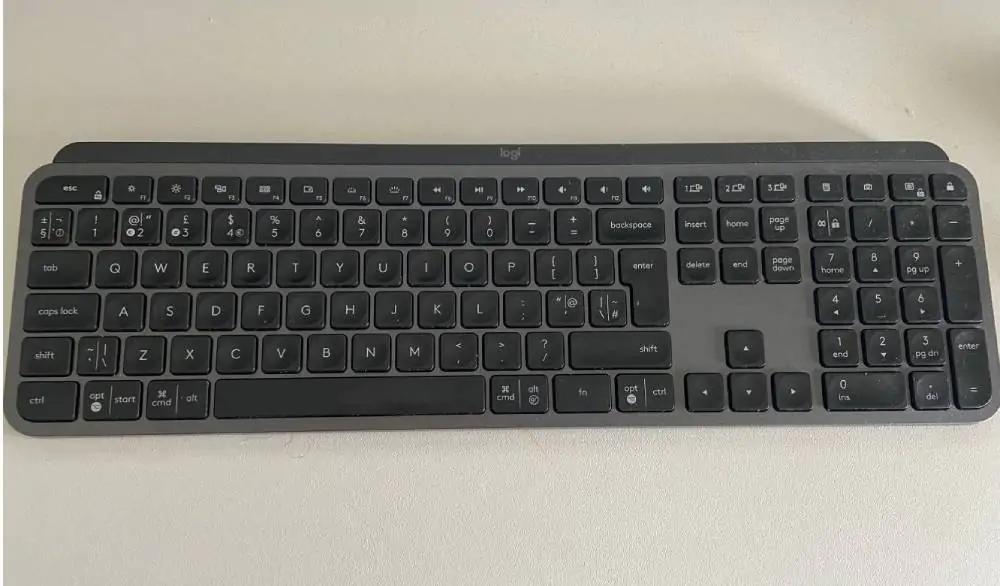
The Logitech MX Keys has customizable software that is easy to use
The Logitech MX Keys is a wireless, illuminated keyboard available on Mac and Windows. Each key contains a minor indentation which promotes good typing and prevents your fingers from slipping, like with a Mac keyboard. This low-profile keyboard also pairs across multiple devices and is light enough to carry.
It’s probably the best keyboard writers can buy today due to its price point, typing experience and ease of use. But don’t take my word for it. This keyboard won a Red Dot Award in 2020 for its design.
You can customize the media keys on this keyboard using Logitech’s software. Bluetooth connectivity is rock-solid and the battery life is excellent. Suffice to say, it pairs nicely with a good Logitech mouse thanks to the included Logitech dongle (you can also just use Bluetooth).
I owned one of these keyboards for two years and only stopped writing with it because I wanted to upgrade to a mechanical keyboard.
Product Features
- Spherically indented keys
- Backlighting
- Customizable media keys
- Pairs across devices, operating systems
- USB-C rechargeable
2. Logitech MX Mechanical
Best mechanical keyboard for writers
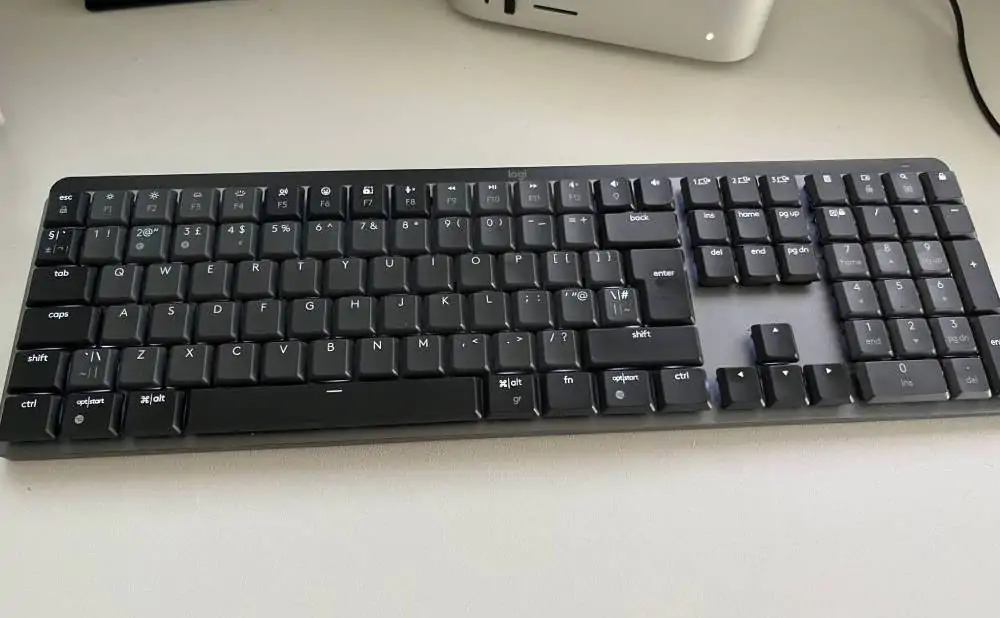
This Logitech MX Mechanical includes customizable media keys, and backlighting, and it also pairs with multiple devices
Logitech finally released a series of mechanical keyboards for Mac and Windows. They come in various sizes. I bought the full-size MX Mechanical for Mac. It includes customizable media keys, and backlighting, and it also pairs with multiple devices. Writers can opt for a clicky, tactile quiet or linear model.
I purchased the tactile quiet full-size model for Mac. It’s not 100% silent but it’s unlikely to disturb anyone. Sizewise, it takes up about as much space on my desk as an Apple full-size keyboard. I love tying on this keyboard. The battery life is great too. It lasts 15 days with the backlight on full or ten months with it off. That said, I’d recommend trying a mechanical keyboard before buying.
Product Features
- Full-size
- Wireless
- USB-C charger
- Touch ID
3. Apple Magic Keyboard
Previous iterations of the Apple Keyboard featured a flat button design and butterfly mechanism of more recent iterations. That design was prone to typos. After switching to a Logitech keyboard, I only noticed how many typos I was making compared to other keyboards.
Thankfully, Apple has moved away from the butterfly mechanism and back towards scissors keyboards. The current Apple Keyboard connects via Bluetooth and is available in full-size and also without a number pad. It’s comfortable to type with. However, I make fewer typos with a mechanical keyboard. I particularly like the current iteration of the Apple Keyboard featuring touch ID. It will not help you type faster, but it saves time logging in and out of websites and apps.
Product Features
- Full-size/tenkeyless models available
- Wireless
- USB-C charger
- Touch ID
- Flat profile
4. Keychron K10
2026 update: Keychron has refreshed this line - the current standard model is the K10 Version 2 (QMK firmware, quieter acoustic foams), with a K10 Max and hall-effect K10 HE also available. The original K10 is still sold.
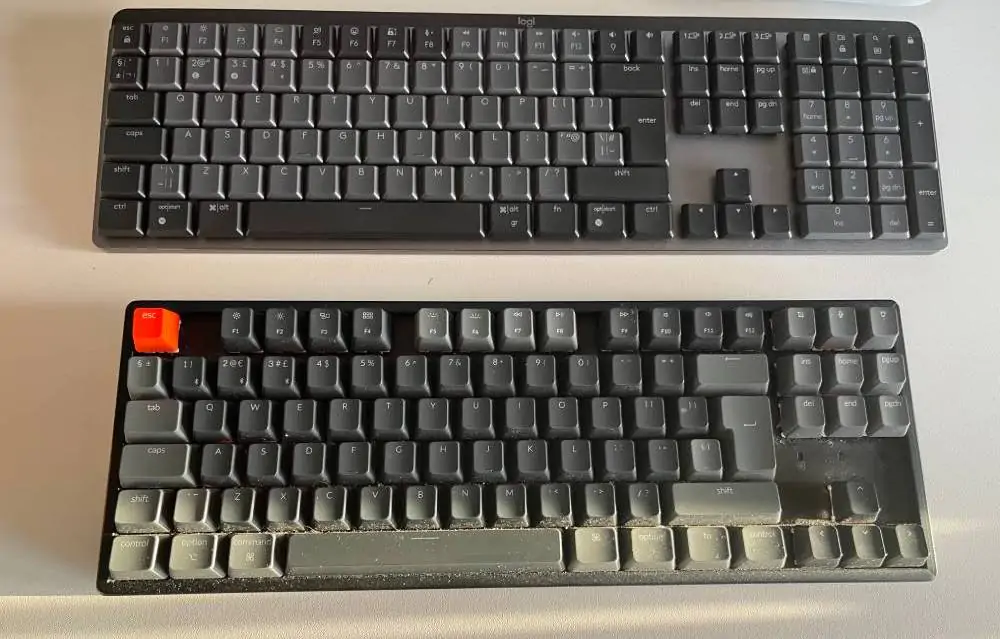
It’s a good keyboard to write with and certainly better than most offerings, but Logitech edges it
Keychron manufactures a series of mechanical keyboards in various sizes for Mac and Windows. Its keyboards are pleasing to look at and type with. They also feature customizable backlighting. I purchased the smaller version, a K2, before upgrading to a full-size version with a number pad.
I wanted to love this keyboard. I typed with it for several months. However, if I stopped using the keyboard for a few minutes, the Bluetooth connection to Mac took a second or two to reconnect. A minor annoyance yes, but it happened several times a day and was enough to impede my workflow.
I made more typos with this mechanical keyboard versus the Logitech version. The battery life also wasn’t great, and I had to charge this keyboard more frequently than the Logitech mechanical keyboard. After I turned off its backlighting effects, the keyboard’s battery life dramatically improved. It’s also not possible to customize the keyboard’s media keys much as it lacks dedicated software. It’s a good keyboard to write with and certainly better than most offerings, but Logitech edges it.
Product Features
- Keycaps for Windows and Mac OS
- RGB backlight, 15 types
- Mechanical, hot-swappable keys
- Red, blue and brown Gateron switch options
- Wired and wireless
- USB-C charger
- Connects to three devices
- Media keys
5. Keychron K2
Best portable mechanical keyboard for writers
Many writers prefer a tenkeyless keyboard design, that is one without a keyboard. If so, consider the Keychron K2. It’s a wireless mechanical keyboard that works great on Windows and (mostly) great on Mac.
This smaller model lacks a dedicated keypad, and the keys are closer together, hence the small size! Pay particular attention to the smaller carriage return or enter key. The K2 is approximately 30% smaller than the K10 and looked neat on my desk. It’s relatively lightweight and nice to type with. It’s a nice choice for most writers, particularly if you work on the go and want to bring a mechanical keyboard to write with via a laptop or Macbook. However, I experienced the same laggy Bluetooth issues when my Mac went to sleep.
Product Features
- Keycaps for Windows and Mac OS
- RGB backlight, 15 types
- Mechanical, hot-swappable keys
- Red, blue and brown Gateron switch options
- Wired and wireless
- USB-C charger
- Media keys
- Connects to three devices
6. Logitech Ergo K860 Wireless Ergonomic Keyboard
Best ergonomic keyboard for writers on Mac
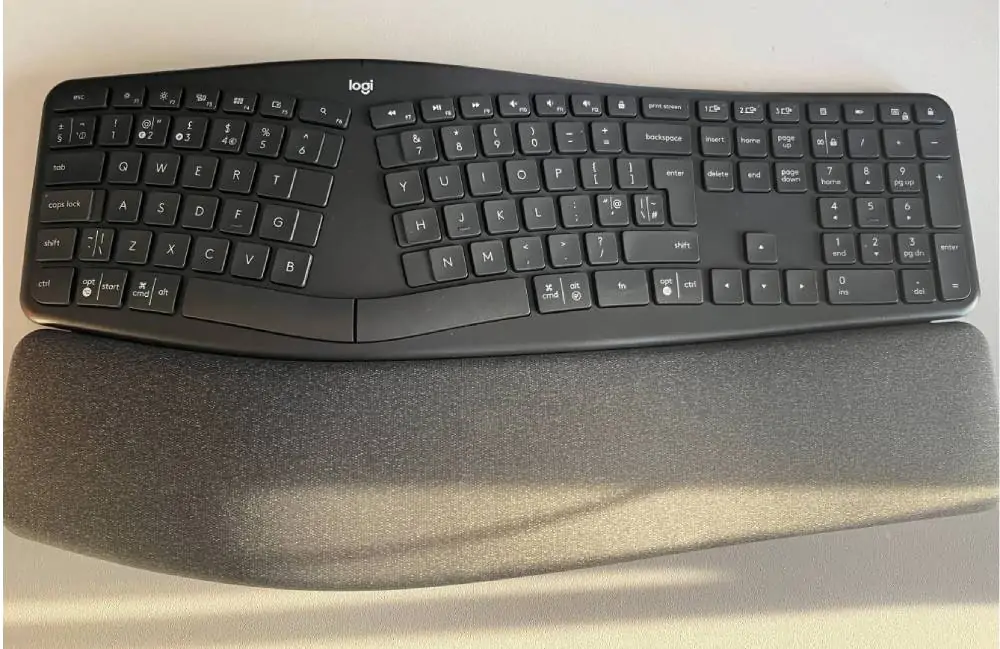
This keyboard features a split keyframe on a sloped, curved key field, to minimise strain on forearms and wrists while typing
The Logitech Ergo K860 is designed to promote natural body posture and motion while typing and reduce fatigue. Unlike competitors like the Magic Keyboard by Apple and the AmazonBasics wireless keyboard, the Ergo K860 is centered around user comfort. The ergonomic design of the Logitech Ergo K860 promotes comfortable typing with a more naturally relaxed positioning of arms, wrists, and palms. It improves typing posture and reduces muscle tension and includes a wrist rest. It doesn’t feature RGB backlighting.
This keyboard features a split keyframe on a sloped, curved key field, to minimise strain on forearms and wrists while typing and help keep shoulders and neck more relaxed than when using standard rectangular keyboards.
The palm and wrist rest is pillowed, providing more than 50 per cent additional wrist support than traditional keyboards. Scooped switches are contoured to fingertips for ideal keying action with minimal slip and friction. The Logitech Ergo K860 claims to deliver stable keystrokes that reduce keying noise. It also pairs with multiple devices.
I wanted to like this keyboard, but I found it quite large for my desk, let alone carry around. I also couldn’t adapt to the ergonomic design. That said, writers comfortable with ergonomic keyboards will enjoy it. It’s also the best, and one of the few ergonomic, keyboards available for Windows and Mac.
Product Features
- Natural ergonomic split-frame keyboard
- Works as a wireless keyboard with a USB receiver or a Bluetooth keyboard from as far as 10 metres.
- Quiet switches with fingertip-contoured tops
- Pillowed palm rest with multiple layers of cushioning
- Adjustable palm raise support
- Legs tilt to 0°, -4°,or -7° for further enhanced ergonomic adjustability
- Supports up to 3 connected devices
- Includes Logitech FLOW Control capability
- Media keys
7. Das Mechanical Keyboard 6 Pro
Best alternative mechanical keyboard for writers
DAS has been manufacturing mechanical keyboards since 2005. If you type a lot, like the old-school feel of mechanical keyboards and miss modern features like media buttons, these keyboards are a great option.
They reduce typos and other mistakes as the switch keys require more effort to press, thus your finger is less likely to slip. They’re more expensive than a traditional keyboard but built to last. You can pick from a noisy (clack, clack) or quiet version.
DAS mechanical keyboards are available for Windows and Mac computers, in various sizes and styles. I owned a full-size DAS mechanical keyboard for Mac, for five years. I only stopped using it because one of the keys broke and replacement parts were pricier than I thought… plus I wanted to test a different type of keyboard. I found the DAS keyboard pleasing if loud to type on. If buying again, I’d opt for the quieter model.
Product Features
- Adjustable volume knob and media keys
- White LED backlighting
- Cherry MX switches
- 2-port USB port C hub
- Screw on feet
- Aluminium enclosure
- N-key rollover
8. Razer BlackWidow Elite
2026 update: the BlackWidow Elite has been discontinued. Its current successor is the Razer BlackWidow V4.
Razer manufactures mechanical keyboards for gamers, but writers can use them too. The Razer BlackWidow Elite is a Windows-friendly wired, ergonomic keyboard. It features colorful backlit keys, and it’s available with clicky and silent yellow switches.
As it’s a gaming keyboard, writers can customize key settings using proprietary Razor software. You can also create macros for quickly opening a series of games (or writing apps). It’s fast and responsive to type with.
That said, the BlackWidow Elite costs under $200 and is far from the cheapest option for writers. These keyboards are fun to type with but are not built with writers in m,ind and you’re paying a premium for features you won’t use… unless you also game and enjoy colorful backlighting and macro keys.
Product Features
- Green mechanical switches
- Media keys
- Full size
- Backlighting with 16.9 million colors
- Detachable wrist rest
- Supports five typist or user profiles
- Dedicated media controls and shortcut keys
- Cable routing
9. Logitech K800 Illuminated Wireless Keyboard
2026 update: the K800 is discontinued. For a current illuminated wireless board, Logitech’s MX Keys S is the closest replacement.
The Logitech K800 Illuminated Wireless Keyboard is a membrane keyboard that ditches RGB backlighting for white, brightly backlit lettering on keys, making switches easier to see, even when typing in low light. Special PerfectStroke engineering makes keystrokes quieter and more fluid and more comfortable.
This keyboard is rechargeable with a micro USB cable (included). The Logitech K800 Wireless Keyboard features adjustable lighting. Simply press a button for quick lighting adjustments.
With the K800’s backlit key switches and design to maximise keystroke efficiency and comfort, this keyboard delivers a state-of-the-art typing experience in daylight or low evening light. This model also features 2.4 GHz, for a powerful wireless connection.
A tiny unifying receiver becomes part of your computer, to enable wireless communication with your K800 keyboard. Other Logitech devices can be seamlessly integrated via a USB receiver. I preferred Logitech’s MX model.
Product Features
- Lighted lettering on switches for easy location in low light
- Wireless technology that provides convenient and flexible options
- Fast charging for ready use on-demand
- Dropout-Free 2.4GHz connection
10. Azio Large Print Tri-Colour Backlit Wired Keyboard
This Azio Keyboard has a sleek design considering how cheap it is. It’s a competitor to the AmazonBasics wired keyboard. For writers who work in lower light settings, the Azio ditches traditional RGB lighting for the triple-phase backlighting feature which is a game changer.
The Azio is a membrane keyboard that features oversized letters on the keys, making everything on the keyboard easily identifiable. Shortcut switches enable navigation to sites and software programs. The backlighting options are adaptable to your preferences.
This keyboard is a reasonable choice if you want to buy a new keyboard for writing with…on the cheap. It features large fonts on keys, to help reduce eye strain, especially in lower light, and to facilitate increased typing speed and productivity for writers. I’d recommend investing a bit more in any of the above keyboards. They’ll last longer and improve your typing experience more.
Product Features
- Three-color backlighting, blue, purple, or red illumination
- Easy access switches
- Hot switches for quick commands and multimedia access
- USB enabled
- Large lettering
What is the Best Keyboard for a Writer?
Deciding on the best keyboard for writers is a personal preference. Most writers will love the Logitech MX keys. It’s affordable, nice to type, and has a pleasing build quality. The best mechanical keyboard right now is Logitech MX Mechanical due to its price point and typing experience.
Some Mac typists will enjoy the new Apple full-size keyboard, which solves some of the issues prevalent with the Magic Keyboard, although Logitech edges it for a typing experience. For wrist comfort the Logitech Ergo K860 is the ergonomic pick now that Microsoft has discontinued its own boards, assuming you’re ok with an ergonomic design.
FAQs About The Best Keyboard for Writers
Do you need a special keyboard to type?
Writers don’t need a special keyboard to type. Investing in a good keyboard can reduce typos and dramatically improve the typing experience. A good one can also mitigate issues writers often experience like RSI,
Are mechanical keyboards better for writing?
Mechanical keyboards are better for writing as they increase your typing speed and reduce typos. They are also sturdier and more customisable than standard keyboards. Some writers enjoy the clacking sound of mechanical keyboards too. However, mechanical keyboards take time to adapt to and are usually more expensive than a basic USB keyboard.
Are gaming keyboards any good for writers?
While a gaming keyboard like Razer with its mechanical switches is designed for heavy-duty use, it isn’t the best option for a writer. Many full-size gaming keyboard models like Razer BlackWidow, Steelseries Apex and the Roccat Vulcan feature Razer Opto-Mechanical switches and customization options like PBT keycaps and topre switches. Plus, the gaming keyboard Roccat also has in-house Titan switches. These features aren’t useful to writers and you’ll end up paying a premium to buy a gaming keyboard that will not fulfill your objective as a writer. If you run a digital piano blog, you’ll mostly write keyboard stand reviews and digital piano buying tips. When you write a blog post or even a dystopian novel, do you need PBT keycaps and topre switches like a gaming keyboard from Das Keyboard? Mechanical gaming keyboard brands like Razer also focus more on tenkeyless gaming keyboard models like the Razer BlackWidow, which are useless for writers. These can also be very expensive. The Steelseries Apex Pro, Roccat Vulcan Aimo and the tenkeyless gaming keyboard Razer BlackWidow – to name a few – can cost $200 or more!
Testing Criteria
We update this roundup of the best keyboards for writers. We test them by writing MS Word, blog posts, essays, articles and even book chapters. We factor in price, ease of use and functionality.
Why You Can Trust Us
I’ve written and published dozens of articles for newspapers, magazines, and online publications, including Forbes and Lifehacker. I’m also a best-selling non-fiction author, a trained journalist, and a copywriter. I also previously worked as a technology journalist and covered and reviewed the latest gadgets and gear for various publications and newspapers.
Frequently Asked Questions
What is the best keyboard for writers overall?
The Logitech MX Keys is widely considered the best keyboard for writers overall. It features spherically indented keys for accurate typing, multi-device Bluetooth pairing, USB-C recharging, and customizable media keys. It won a Red Dot Award in 2020 for its design and suits both Mac and Windows users.
What is a tenkeyless keyboard and should writers use one?
A tenkeyless keyboard omits the number pad, resulting in a more compact footprint on your desk. Writers who don’t need to input numerical data frequently often prefer tenkeyless models because they take up less space and allow the mouse to sit closer, reducing shoulder strain during long writing sessions.
What are mechanical keyboards and are they good for writers?
Mechanical keyboards use individual physical switches beneath each key, offering tactile feedback and a distinct keystroke feel. The Logitech MX Mechanical, for example, comes in clicky, tactile quiet, and linear variants. Writers who type for long hours often favor tactile quiet switches for responsive feedback without disturbing others nearby.
How long does the battery last on wireless keyboards for writers?
Battery life varies significantly by model. The Logitech MX Mechanical lasts approximately 15 days with backlighting fully on and up to 10 months with backlighting turned off. The Logitech MX Keys also offers strong battery performance and recharges via USB-C, making both practical choices for writers who prefer a wireless setup.
Are wired or wireless keyboards better for writers?
Both wired and wireless keyboards work well for writers, and the choice depends on personal preference. Wireless keyboards like the Logitech MX Keys reduce desk clutter and allow flexible positioning, while wired keyboards offer a consistent connection with no battery concerns. Writers who move between workspaces typically benefit most from wireless Bluetooth models.
Related Writing Software & Hardware Guides
A great keyboard only solves the physical half of the desk. Pair it with software that stays out of your way:
- Writing Software Hub: Our complete comparison of book writing programs, grammar checkers, and publishing tools.
- Scrivener Review: The $59.99 one-time book drafting workbench I use for long-form nonfiction and novels.
- Ulysses Review & iA Writer Review: Minimalist Markdown editors with typewriter scrolling and keyboard-first shortcuts.
- Best Writing Apps for iPad: The nine apps I pair with a wireless keyboard on my iPad Pro.
- ProWritingAid Review & Best Free Writing Software: Tested editing software and free drafting alternatives.
- Writing Software & Hardware Hub: Compare our tested writing keyboards, note-taking systems, and book drafting software.
About this guide: Written by Bryan Collins, writer and founder of Become a Writer Today. Our recommendations are based on hands-on testing and independent research. Become a Writer Today does not accept payment for rankings or recommendations.
The writer's edit
One practical writing tip, a new tool, and a fresh contest deadline, every Thursday. No spam, unsubscribe anytime.